Protect your forms from spam
Checked against the product on November 25, 2026
Short answer
Open the form's Settings, turn on Spam prevention under Protection to add honeypot protection and stricter rate limits, and use Duplicate prevention with a Per-visitor limit to stop repeat submissions. Response limits and a close schedule shut the form when you are done.
Every public form is rate limited on the server. The settings below make protection stricter for a single form. They apply to the live form, so publish or update the form after changing them.
Turn on spam prevention
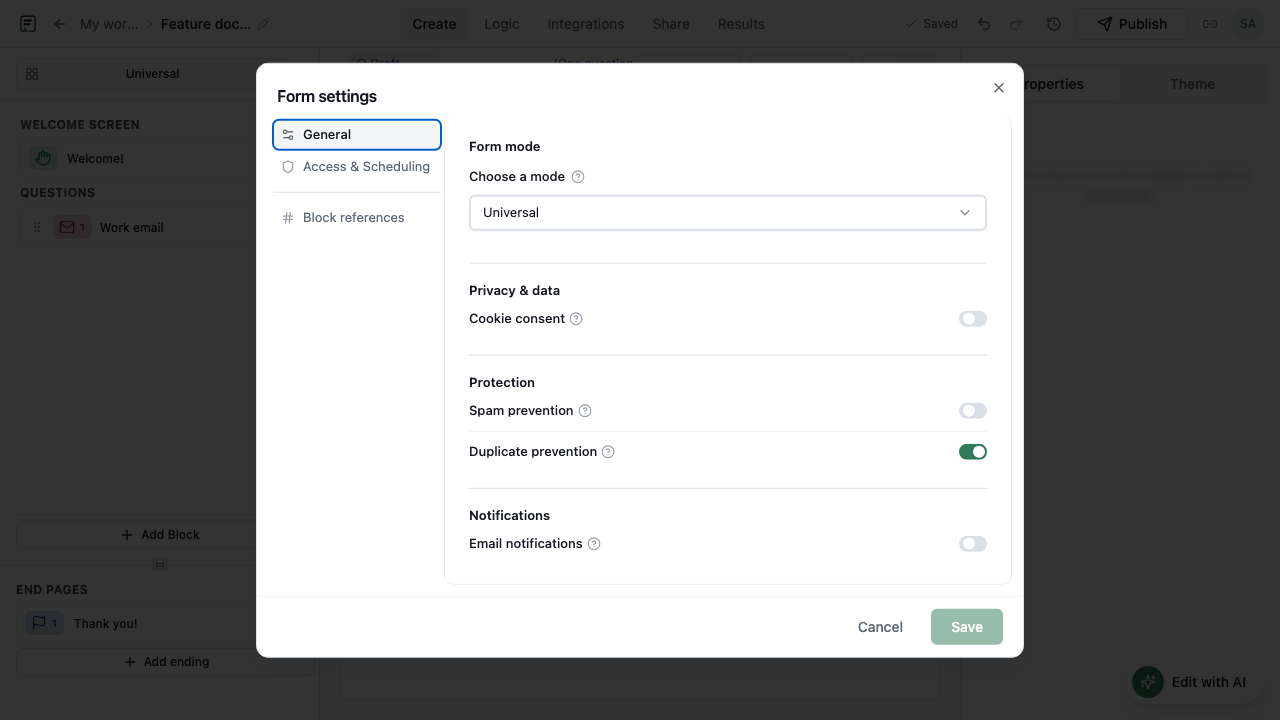
- Open the form in the builder and select Settings above the canvas.
- In the General section, find Protection.
- Turn on Spam prevention. This enables honeypot protection and stricter rate limits for this form.
The honeypot is a hidden field that people never see but simple bots fill in. Empty bot submissions caught by it are dropped. Stricter rate limits lower how many submissions can come from one IP address per minute.
Limit submissions per visitor
- In Settings > General > Protection, turn on Duplicate prevention.
- Open Access & Scheduling and set the Per-visitor limit: Max submissions and the Period after which the counter resets.
- Optionally edit the Limit message shown when a visitor reaches the limit.
Cap or close the form
- Response limit: under Access & Scheduling > Limits, set a Maximum. The form closes after that many complete submissions.
- Close schedule: set Close at to stop accepting responses at a date and time.
- Accept responses: turn it off to close the form immediately.
- Closed message: shown when the form is closed manually, by schedule or by response limit. The default is "This form is no longer accepting responses."
Questions
Will spam prevention block real respondents?
It should not. Browsers sometimes autofill hidden fields, so FormitAI keeps submissions that contain real answers and only drops empty ones.
Does a per-visitor limit need cookie consent?
Duplicate prevention uses cookies. If you need consent, turn on Cookie consent under Privacy & data in the same settings.